
FAQs
Plans and Pricing
This guide explains the available plans and pricing for Bulk Image Edit (shown as Hextom Image SEO in your Shopify Admin), what features come with each plan, how monthly credits work, and what happens when you run out. You’ll also find tips to pick the right plan for your store.
Here’s a quick overview of what each plan offers:
- Starter (Free): Basic edit access with limited monthly credits.
- Basic: Ideal for small catalogs with moderate edit needs.
- Professional: Great for regular bulk editing and scheduling.
- Advanced: More monthly credits and longer backups.
- Enterprise: The most monthly credits and priority support.
How to view or change your plan
Go to your Shopify Admin sidebar and click Plans under Hextom Image SEO. From there you can compare the plans and click Select to upgrade or downgrade.
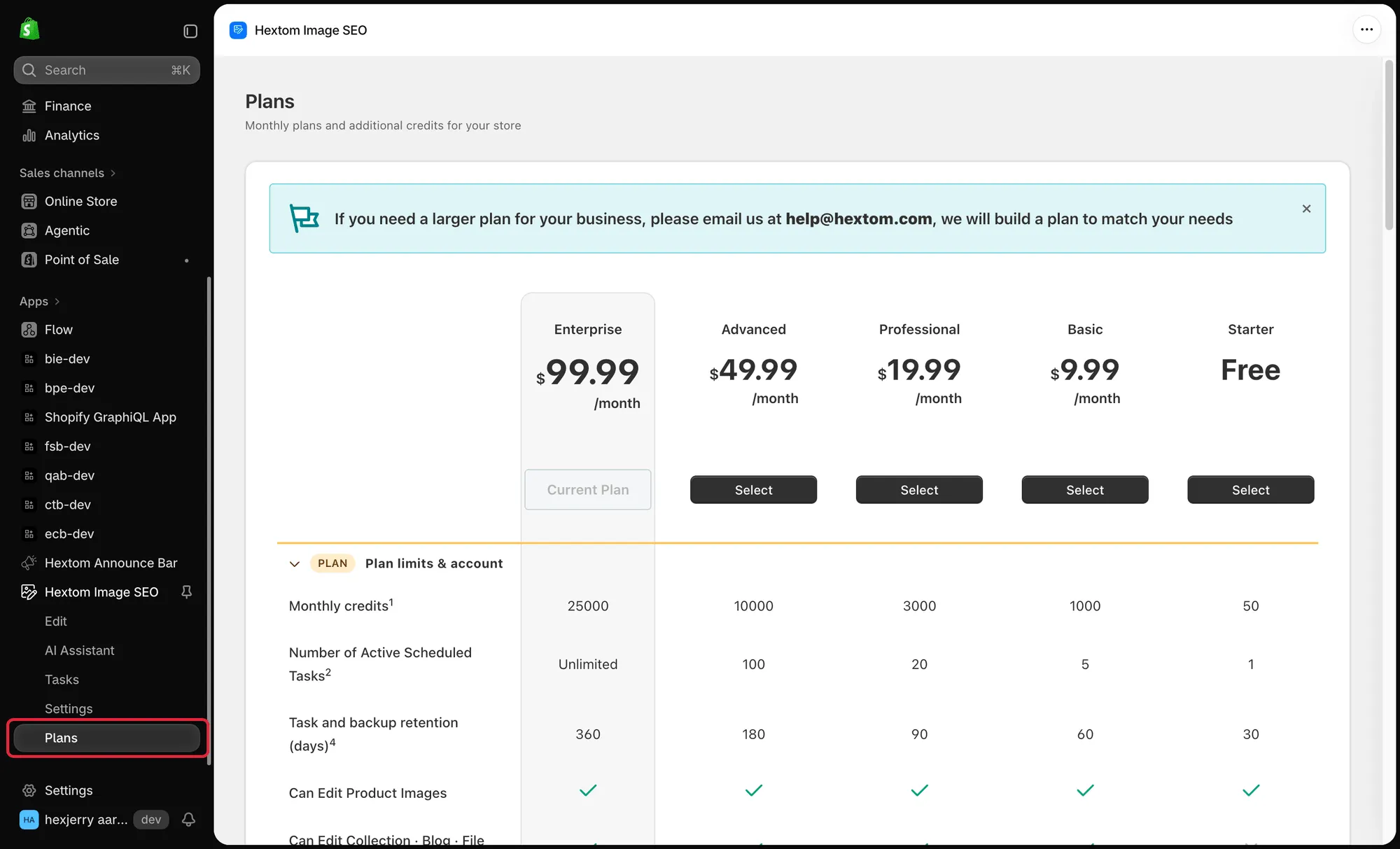
Overview of Plans
Bulk Image Edit offers multiple plans designed to support different store sizes and editing needs. Each plan includes a number of monthly image edits, counted in credits. Higher plans include more credits, making them ideal for stores with bigger product catalogs or frequent bulk updates.
Note: Most tools use 1 credit per image. AI tools (for example Remove background, Enhance quality, and AI-generated alt text) use 2 credits per image. Tools marked Free on the dashboard don’t use any credits.
Plan prices (monthly)
- Starter: Free (50 image edits)
- Basic: $9.99 (1,000 image edits)
- Professional: $19.99 (3,000 image edits)
- Advanced: $49.99 (10,000 image edits)
- Enterprise: $99.99 (25,000 image edits)
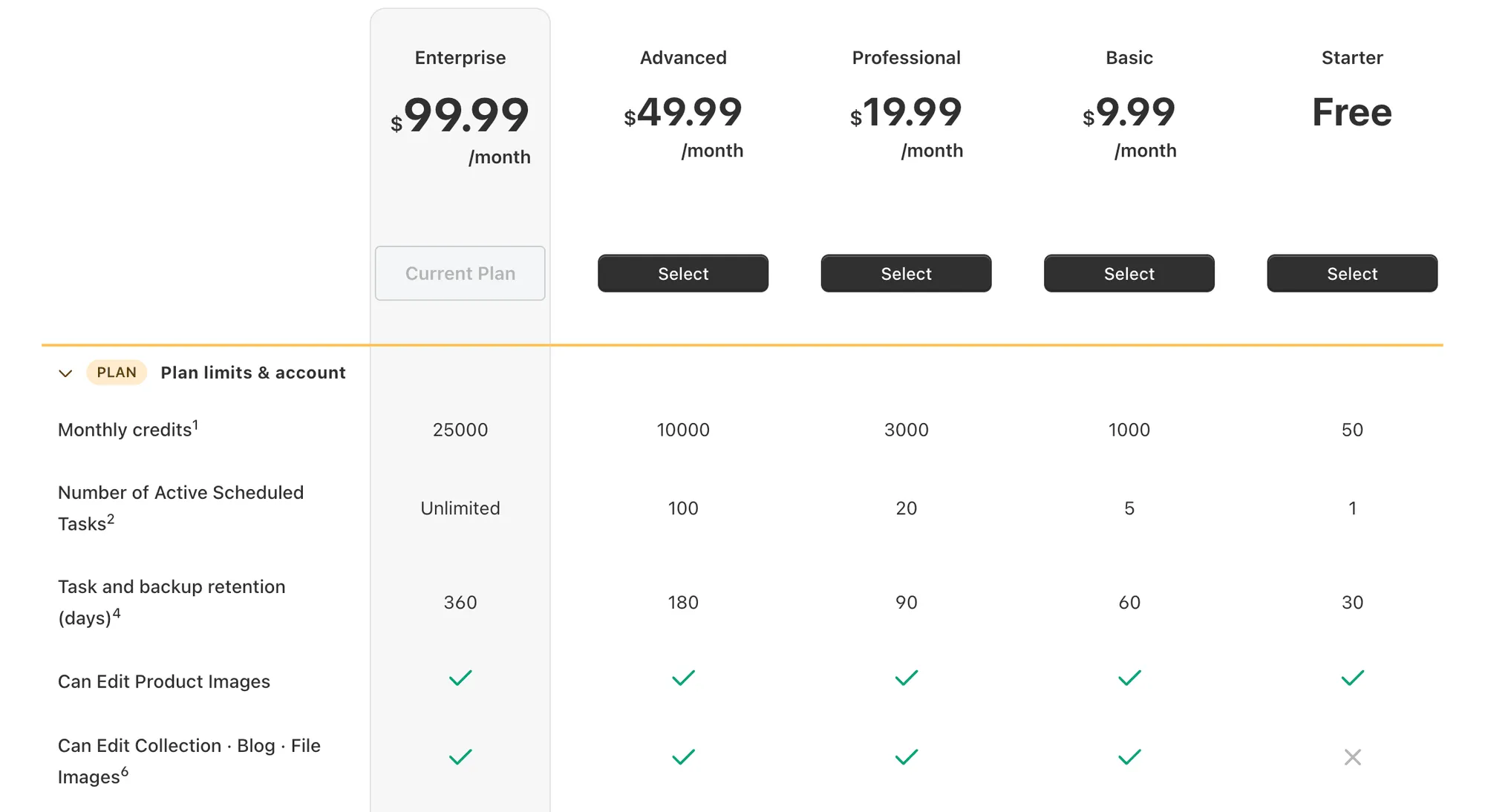
The screenshots below show the full list of features available in each plan.
Plan limits: monthly credits, active scheduled tasks, task and backup retention, and which image types you can edit.
SEO & AI search: JSON-LD, AI crawler rules, and Increase AI exposure are available on Professional and higher.
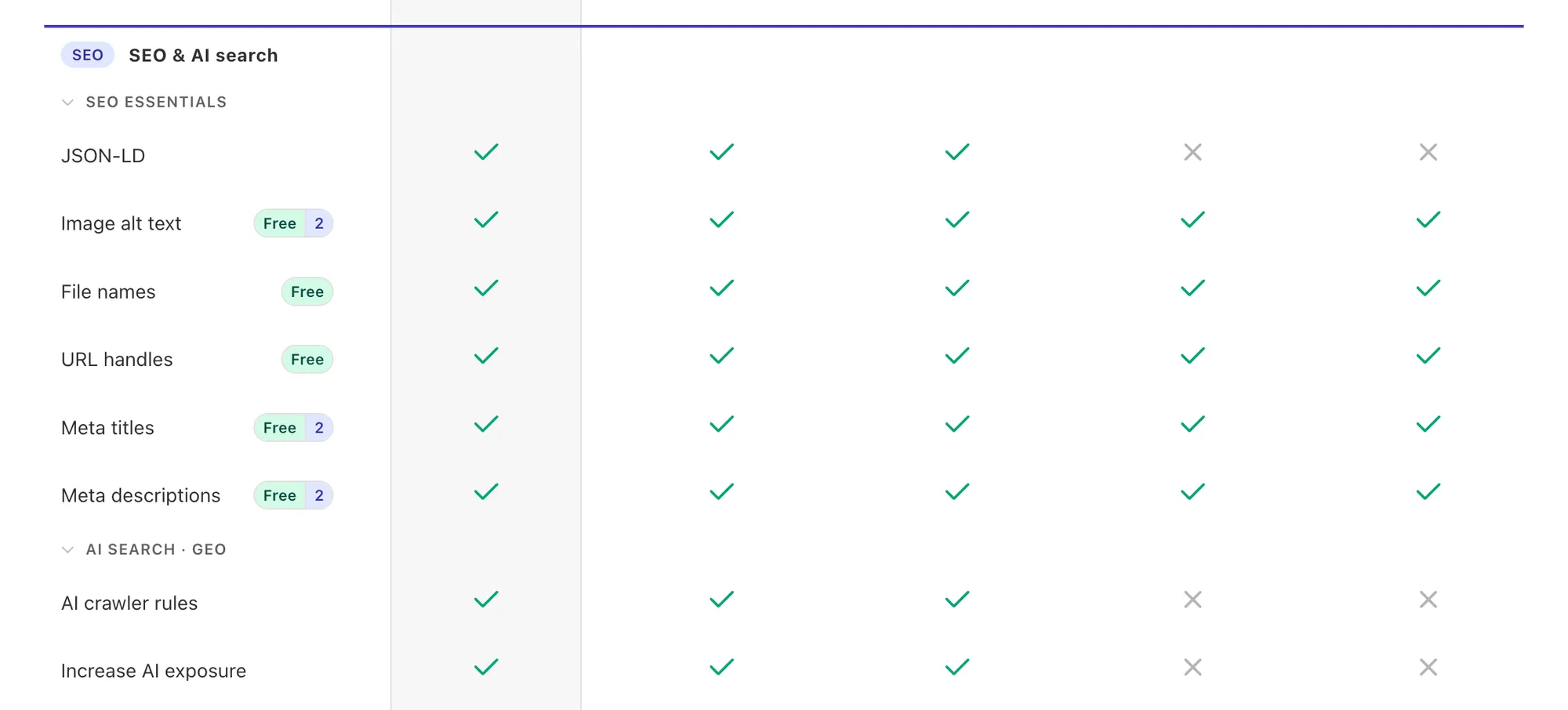
Image edit: all editing and AI enhance tools are available on every plan. Backup images is available on Basic and higher.
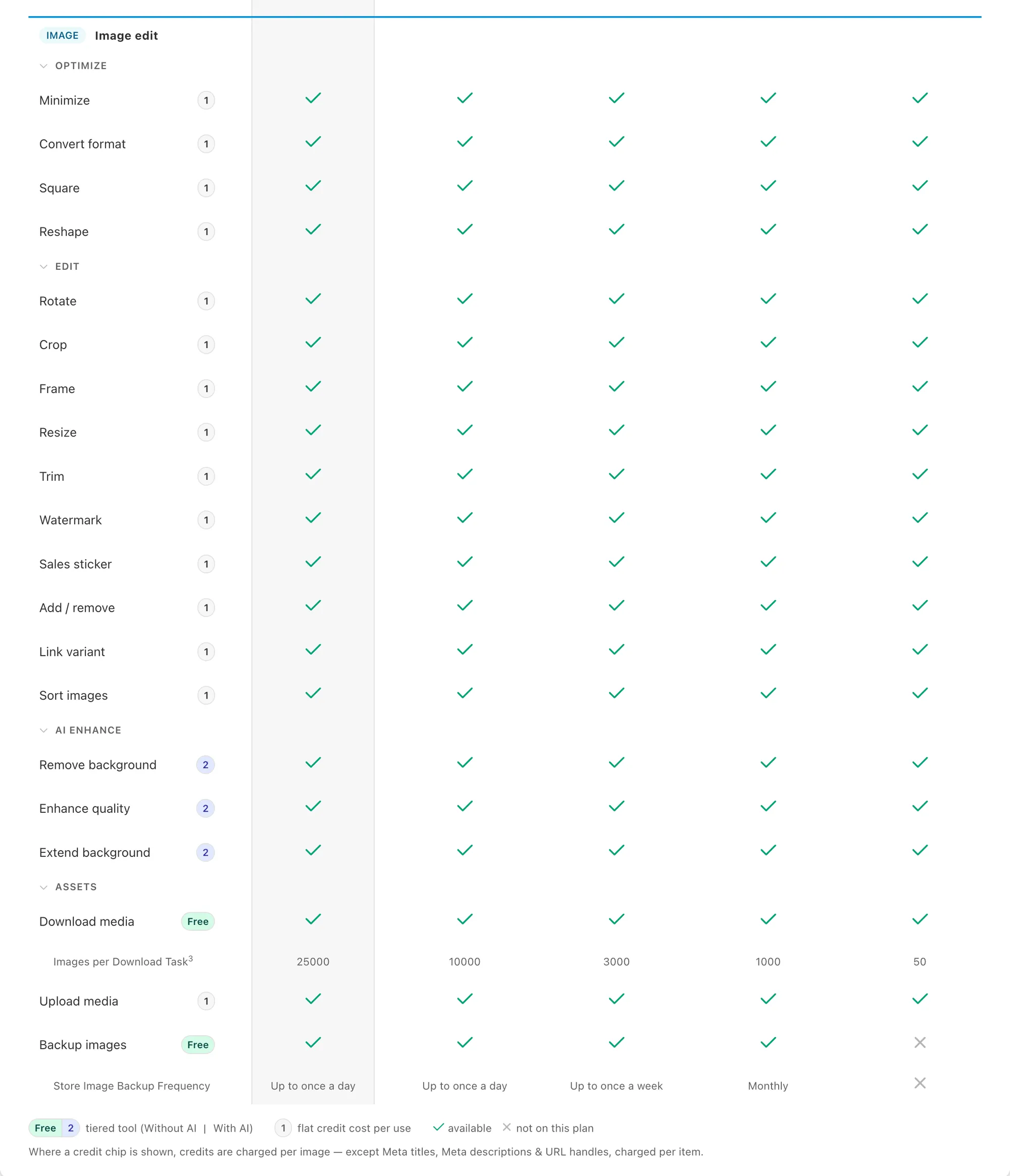
Note: Plan pricing and edit limits may change over time. For the most up-to-date details, please refer to the Plans page inside the app.
Additional Credits
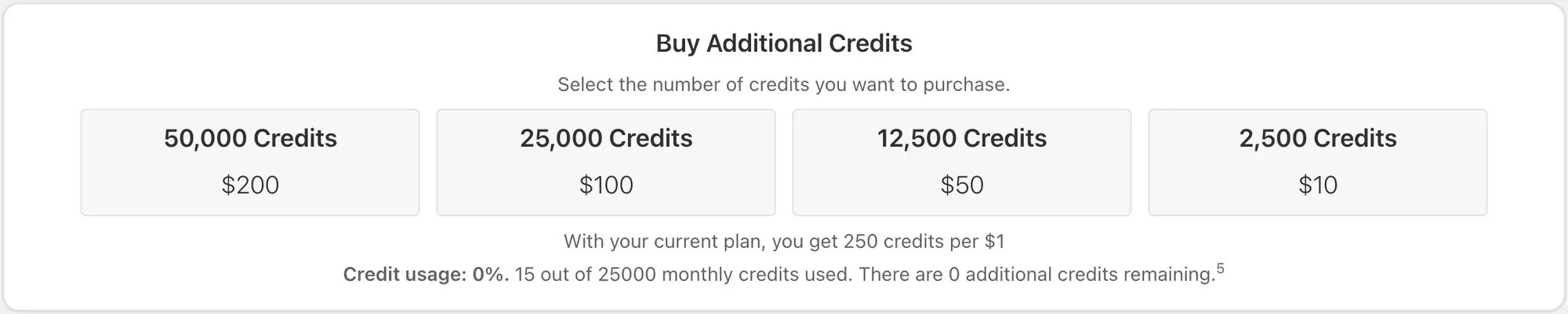
If you exceed your monthly credits, you can purchase additional credits at any time to continue editing without interruption, without changing your plan. The prices and the number of credits available for purchase may vary depending on your plan. Below are the available options for extra credits for each plan:
Free Plan:

Basic Plan:

Professional Plan:

Advanced Plan:

Enterprise Plan:
Custom Plans
Need more than 25,000 image edits a month? Email us at help@hextom.com and we’ll build a plan to match your needs.
FAQs and Tips
How Monthly Credits Work
Every image a task edits uses credits from your monthly allowance. For example:
- Resizing 20 images uses 20 credits.
- Removing the background from 20 images (an AI tool) uses 40 credits.
- Editing the same image again in a new task uses credits again.
Monthly credits reset automatically on the first day of each month.
Previews and task setup don’t use credits. Credits are only used when a task is applied.
What Happens When You Run Out of Monthly Credits
When you’ve used all your monthly credits, you can’t edit images until your credits reset. Every edit requires server processing, which is why plans have a monthly limit. You can choose to:
- Wait for your credits to reset
- Buy additional credits
- Upgrade to a higher plan with more monthly credits
- Review and plan future tasks to avoid unnecessary edits
Does Reverting a Task Restore Credits?
Reverting a task does not restore credits. Even if an image returns to its original state, the credits have already been used and cannot be refunded. It simply re-uploads the backup image that was produced by the task. Backups are stored for a specified amount of time depending on the app plan you are subscribed to.
For this reason, we recommend carefully previewing tasks before applying them to avoid unnecessary edits.
Choosing the Right Plan
To select the best plan for your store, consider the following:
- Small stores or occasional edits - The Starter and Basic plans are often enough for testing features or making infrequent updates.
- Medium-sized catalogs - The Professional plan is recommended if you regularly update images, add watermarks, or resize product images.
- Large stores or frequent bulk edits - The Advanced and Enterprise plans are ideal for stores with tens of thousands of images or ongoing bulk image optimization needs.
Related guides
- The app says “Out of Monthly Edits”. What do I do now?: what to do when you reach your monthly limit.
- How do I cancel my plan/subscription?: how to downgrade or cancel.
If you need assistance, please email us at help@hextom.com and we’d be happy to help!